The construction industry loves to overcomplicate things. We turn simple problems into complex solutions that require consultants, committees, and capital expenditures. Meanwhile, the real work sits waiting.
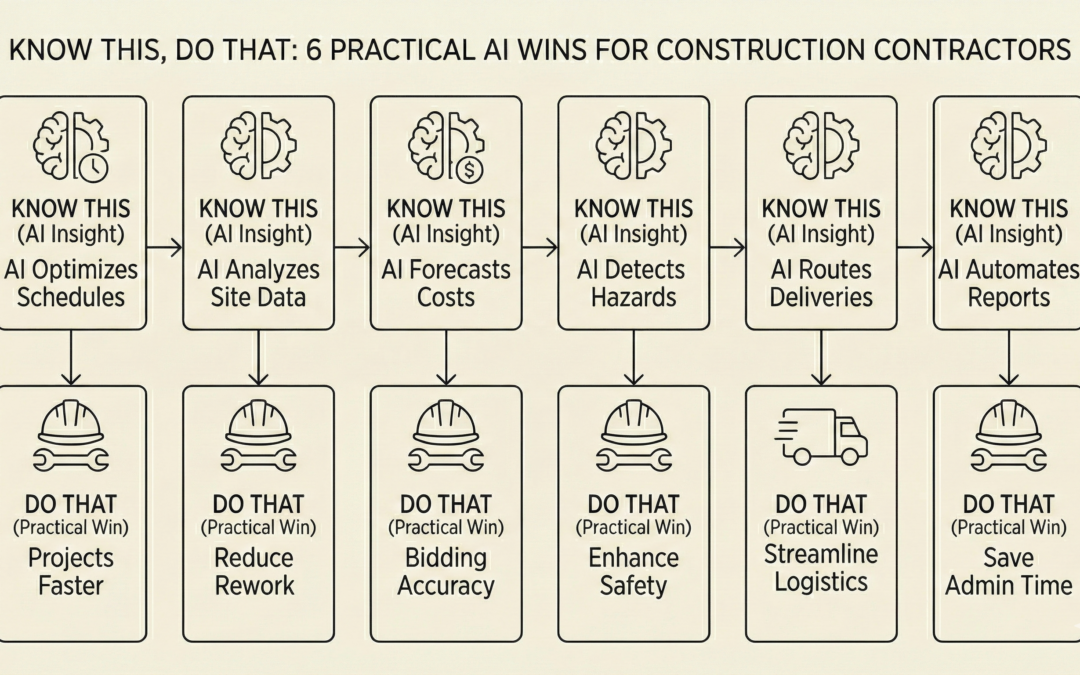
Nic Bittle's book "Know This, Do That" cuts through that nonsense with a refreshing approach: understand the principle, then execute the action. Just the knowledge you need paired with the steps to apply it.
That same philosophy works perfectly for AI adoption in construction. You don't need a consultant, a massive budget, or a computer science degree to start using AI effectively in your construction business. You just need to know what works and how to do it.
Here are six practical applications you can implement this week, inspired by Bittle's straightforward approach. Each follows his simple pattern: understand why it matters, then follow the steps to make it happen.
1. Turn Voice Notes Into Professional Daily Reports
Know This: Your superintendents and foremen spend 30 to 45 minutes at the end of each day writing daily reports. They're tired, they want to go home, and the reports often lack important details because writing them feels like a chore. Voice is faster than typing, and AI can convert rough spoken notes into polished professional documentation.
Do That:
- At the end of the day, open the voice recording app on your phone (every smartphone has one built in).
- Walk the site and speak your daily report out loud: "Today we had eight electricians on site. We completed all rough-in work in the second floor east wing. Weather was clear, 68 degrees. We had one safety incident, minor cut on apprentice Johnson's hand, first aid administered, no lost time. Tomorrow we start panel installation. We're waiting on the electrical inspector who's scheduled for Thursday."
- Stop recording and use your phone to play it back. Open ChatGPT (free version works fine) on your phone or computer.
- Type this prompt: "Convert this voice memo into a professional daily construction report with proper formatting and sections." Then copy and paste the transcription or upload the audio file if using ChatGPT Plus.
- Review what AI produces, make any corrections needed, and send it to your project manager.
Time saved: 20 to 30 minutes per day. Quality improved: reports become more detailed because speaking is easier than writing.
2. Generate Custom Safety Toolbox Talks in Minutes
Know This: Generic toolbox talks that you've used fifty times don't engage your crew. Workers tune out because they've heard it all before. But creating custom talks for specific tasks takes time you don't have. AI can generate tailored safety content for the exact work you're doing today, making your toolbox talks relevant and engaging.
Do That:
- Before your morning toolbox talk, open ChatGPT on your phone.
- Type this prompt: "Create a 5-minute toolbox talk for [specific task]. Include three main hazards, specific controls for each hazard, and questions to check understanding. Keep the language conversational for experienced tradespeople."
- Example: "Create a 5-minute toolbox talk for installing exterior HVAC units on a commercial rooftop. Include three main hazards, specific controls for each hazard, and questions to check understanding. Keep the language conversational for experienced tradespeople."
- Review the output. Add any site-specific details or recent incidents that relate to the topic.
- Deliver the talk to your crew using the AI-generated content as your outline.
Time saved: 15 to 20 minutes of preparation. Quality improved: talks are specific to today's work instead of recycled generic content.
3. Draft Professional Emails That Actually Get Responses
Know This: You know what you want to say, but turning it into a clear professional email takes longer than it should. You rewrite sentences, worry about tone, and still send messages that generate more questions instead of answers. AI can take your rough thoughts and turn them into clear, professional communication.
Do That:
- When you need to send an important email, don't start in your email program. Open a notes app or ChatGPT instead.
- Write out the key points in rough form: "Need to tell GC that electrical inspection failed because they didn't coordinate plumbing penetrations with us. Inspector tagged six locations. We need them to fix before we can proceed. This is delaying our schedule by three days. Need meeting tomorrow to resolve."
- Copy that rough text and paste it into ChatGPT with this prompt: "Turn this into a professional email to a general contractor. Keep it direct but diplomatic. Include a clear request for next steps."
- Review the AI-generated email. Adjust anything that doesn't sound like you or doesn't capture the situation accurately.
- Copy the final version into your email and send.
Time saved: 10 to 15 minutes per important email. Quality improved: clearer communication that gets action instead of creating confusion.
4. Analyze Specifications to Catch Problems Before They Cost You
Know This: Project specifications are hundreds of pages long and nobody reads every word. That's how you miss the paragraph on page 247 that requires a specific submittal timeline or an unusual material requirement. These oversights cost money and create conflicts. AI can review specifications faster than any human and flag items that need attention.
Do That:
- Get the project specifications in PDF format from the general contractor or owner.
- Open ChatGPT Plus (this requires the paid version, $20/month, because you need to upload documents).
- Upload the specifications PDF and type this prompt: "Review these specifications for [your trade]. Identify any requirements that are unusual, more stringent than standard practice, or that have specific timing requirements. List them with page numbers."
- Example: "Review these specifications for electrical work. Identify any requirements that are unusual, more stringent than standard practice, or that have specific timing requirements. List them with page numbers."
- Read through the AI's findings. Go to each page number mentioned and verify the requirement in context.
- Create a list of these items for your estimator and project manager so they're addressed in pricing and planning.
Time saved: 3 to 5 hours of specification review. Money saved: avoiding change orders and conflicts from missed requirements.
5. Create Punch List Documentation That Actually Gets Items Closed
Know This: Punch list items drag on because documentation is unclear. "Fix wall in room 203" doesn't tell anyone what's actually wrong. Taking photos and writing detailed descriptions for every item is tedious, so people rush it. Then you end up with arguments about what needs to be fixed and whether it was done correctly. AI can help you create crystal-clear punch list documentation using photos.
Do That:
- Walk the punch list with your phone. Take a clear photo of each deficiency.
- For each photo, open ChatGPT and upload the image.
- Type this prompt: "Describe this construction deficiency in specific terms suitable for a punch list. Include what's wrong, where it's located based on what's visible, and what's needed to correct it."
- If needed, add context in your prompt: "This is a paint issue in the main conference room" or "This is misaligned door hardware in unit 304."
- Compile all the AI-generated descriptions with their photos into your punch list document.
- Submit to the general contractor or owner with clear photographic evidence and specific descriptions.
Time saved: 1 to 2 hours on a typical punch list. Disputes avoided: clear documentation prevents arguments about what needs fixing.
6. Build a Knowledge Base from Your Experienced Workers
Know This: Your best superintendent has 30 years of experience solving problems, but that knowledge exists only in his head. When he retires or moves to another project, it's gone. You can't follow him around writing everything down, and he doesn't have time to create training manuals. AI can help you capture his expertise through simple conversations.
Do That:
- Identify a topic where an experienced worker has valuable knowledge: "How do you coordinate underground utilities on a tight site?" or "What's your process for managing material deliveries on a high-rise?"
- Sit down with that person for 15 to 20 minutes. Use your phone to record the conversation (with their permission).
- Ask them to explain their process like they're training someone new. Let them talk through their approach, common mistakes to avoid, and tips they've learned over the years.
- Take the recording and upload it to ChatGPT (or transcribe it using your phone's transcription feature first).
- Use this prompt: "Convert this experienced tradesperson's explanation into a step-by-step guide for less experienced workers. Keep their voice and practical tips but organize it clearly with numbered steps and key points highlighted."
- Review the output with your experienced worker to make sure it's accurate. Save it in a shared folder where your whole team can access it.
Time saved: hundreds of hours that new workers would spend learning through trial and error. Knowledge preserved: expertise that would otherwise be lost when experienced workers leave.
The Bittle Principle Applied to AI
What makes Nic Bittle's "Know This, Do That" approach so effective is that it respects your intelligence while acknowledging your time constraints. You're not stupid. You're busy. You don't need another book telling you why change is important. You need someone to show you exactly what to do.
The same applies to AI in construction. The contractors who will dominate 2026 aren't the ones who understand AI theory perfectly. They're the ones who implement it practically. Small wins compound. One time-saving process leads to another. Six months from now, you'll look back and realize your operation runs fundamentally differently than it did before.
Start With One
You don't need to implement all six strategies this week. Pick the one that addresses your biggest current pain point. Try it on a real project task. See how it works. Adjust it to fit your specific situation.
Then pick another one next week.
The best part? You don't need permission, budget approval, or committee meetings. You just need a smartphone and the willingness to try something new.
Know this: AI tools are available right now that can make your job easier starting today.
Do that: pick one item from this list and try it tomorrow.